
Boosting Employee Engagement with Dynamic Workflows in Staffing Operations

Updated: Apr 1
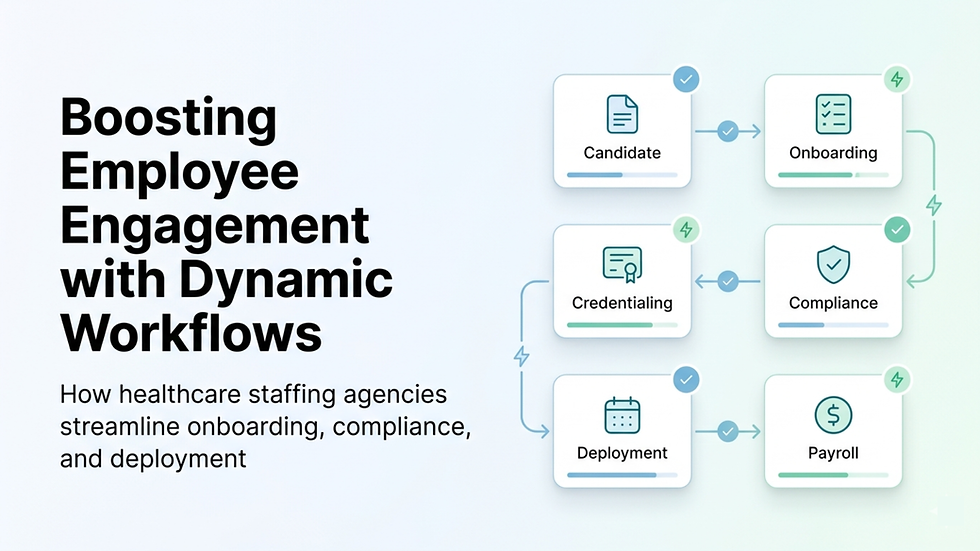
Dynamic workflows in staffing operations are one of those things most agencies don’t think about until something starts breaking.
At some point, recruiters are chasing candidates, compliance is lagging behind, and onboarding feels slower than it should. That’s usually when teams start looking at systems like healthcare staffing software platforms to bring some structure back.
Because in reality, engagement issues aren’t about motivation, they’re about how smoothly your internal processes run.
Many agencies don’t lose candidates due to a lack of interest. They lose them in the gaps:
Between application and onboarding
Between onboarding and compliance
Between compliance and deployment
And those gaps often exist when there’s no centralized workforce management system holding everything together.
Why Do Healthcare Staffing Agencies Struggle with Employee Engagement?
One pattern shows up again and again.
You speak to an operations manager, and they’ll say:
“We have candidates. We just can’t move them fast enough.”
That’s the real issue.
From what we’ve seen across implementations:
Candidates lose interest during credentialing delays
Recruiters rely on memory or spreadsheets for follow-ups
Compliance checks happen too late in the process
Communication is scattered across too many tools
None of this is intentional. It’s just how systems evolve when teams grow fast.
👉 What usually breaks at scale:
There is no communication or coordination between steps.
How Do Dynamic Workflows Improve Candidate Engagement in Staffing?
Dynamic workflows don’t magically “engage” candidates.
What they actually do is remove friction.
When processes are connected through something like automated staffing workflows, things start happening at the right time without someone needing to remember every step.
For example:
A candidate applies → they immediately receive the next steps
Documents are uploaded → compliance is notified automatically
Compliance clears → recruiter gets alerted
No waiting. No confusion.
That consistency makes a bigger difference than most agencies expect.
Example: Candidate Journey with vs Without Workflows
Stage | Without Workflow | With Dynamic Workflow |
Application | Manual review delays | Auto-screening + instant response |
Credentialing | Back-and-forth emails | Automated document tracking |
Onboarding | Inconsistent steps | Standardized onboarding checklist |
Deployment | Last-minute surprises | Real-time readiness tracking |
👉 Key takeaway for operations leaders:
Engagement improves when nothing gets stuck between stages.
What Are Dynamic Workflows in Staffing Operations (Practically)?
At a practical level, dynamic workflows are just if-this-then-that systems for your operations.
But in healthcare staffing, they become more critical because of compliance.
Typical examples include:
Blocking deployment if credentials are incomplete
Triggering alerts when licenses are about to expire
Routing candidates automatically between teams
Ensuring onboarding steps aren’t skipped
Where agencies go wrong is trying to overbuild too early.
👉 Common operational mistake:
Trying to automate everything instead of fixing one broken workflow first.
How Can Agencies Use Dynamic Workflows to Reduce Onboarding Delays?
Onboarding delays are one of the most common and most underestimated problems.
It’s rarely one big issue. It’s usually 6–7 small delays stacked together.
And without something like automated onboarding and credentialing workflows, those delays compound quickly.
One ops lead put it very simply:
“We don’t lose candidates. We slow them down until they leave.”
Where delays usually happen:
Missing documents that no one follows up on
Manual verification queues
No clear ownership between teams
Lack of visibility into status
What changes with workflows:
Document requests go out automatically (often through systems like digital onboarding systems)
Candidates get real-time updates
Compliance teams receive documents instantly
Everyone can see where things are stuck
👉 Pro tip for staffing agencies:
If onboarding takes more than a few days, there’s almost always process friction hiding somewhere.
How Do Dynamic Workflows Help with Compliance and Credentialing?
Compliance is where things tend to fall apart quietly.
At a smaller scale, spreadsheets work. On a larger scale, they don’t.
Without real-time credential tracking systems, teams usually end up:
Missing expiration dates
Rushing compliance before deployment
Handling issues reactively instead of proactively
And that creates risk not just operationally, but legally.
With workflows in place:
Credentials are checked before deployment
Expiry reminders are triggered automatically
Non-compliant candidates are flagged early
Every action is recorded
👉 What usually breaks at scale:
Manual tracking stops working somewhere between 50 and 100 active workers.
How Can Dynamic Workflows Reduce Recruiter Workload?
Most recruiters aren’t struggling with sourcing.
They’re struggling with everything around it.
Without integrated ATS and workflow automation, their day looks like:
Following up manually
Checking candidate status repeatedly
Coordinating with compliance
Answering the same questions multiple times
That’s where workflows help, not by replacing recruiters, but by removing repetitive work.
What changes:
Follow-ups happen automatically
Tasks are assigned clearly
Bottlenecks become visible
👉 Key takeaway:
Recruiters perform better when they’re not acting as project managers for every candidate.
Where Does Vars Health Fit into Dynamic Staffing Workflows?
Most agencies don’t have a single system problem.
They have a system disconnect problem.
Different tools handle different parts of the workflow, instead of operating as a unified healthcare staffing operations platform.
That’s where things break:
Handoffs get missed
Information doesn’t sync
Teams operate in silos
In practice, what helps is connecting those steps.
For example:
Candidate uploads documents → triggered via a centralized staffing workflow engine
Compliance clears → recruiter is notified
Candidate is assigned → payroll and billing workflows begin
This isn’t about adding more tools.
It’s about making sure each step leads to the next without friction.
👉 Important:
Even the best software won’t fix a broken process, but it will make a good process consistent and scalable.
How Do You Implement Dynamic Workflows Without Breaking Operations?
A lot of agencies overcomplicate this.
They try to fix everything at once and end up fixing nothing properly.
A more realistic approach:
Step 1: Identify bottlenecks
Use insights from staffing analytics and reporting tools
Step 2: Start small
Pick one workflow (usually onboarding or compliance)
Step 3: Define the process clearly
No ambiguity
Step 4: Add automation gradually
Don’t overbuild early
Step 5: Measure results
Time-to-deploy
Drop-offs
Recruiter workload
👉 Pro tip:
One well-optimized workflow beats five half-built ones.
What Advanced Workflow Strategies Actually Work at Scale?
Once the basics are stable, agencies start layering more intelligence.
1. Layered Logic Workflows
Supported by rule-based automation in staffing software
2. Client-Specific Workflows
Different clients = different requirements
Handled through client-specific staffing workflows
3. Performance-Based Prioritization
Not all candidates are equal workflows can reflect that
4. AI-Assisted Optimization
Using insights from data-driven staffing platforms
Identify patterns
Predict outcomes
Adjust workflows over time
Checklist: How to Maintain Healthy Dynamic Workflows
Task | Frequency | Why It Matters |
Audit workflows | Monthly | Remove outdated steps |
Analyze performance | Quarterly | Identify bottlenecks |
Gather feedback | Bi-monthly | Improve usability |
Update compliance | As needed | Stay compliant |
Test fallback logic | Biannually | Prevent failures |
👉 Long-term success depends on visibility, often supported by operational visibility dashboards
FAQs: Dynamic Workflows in Healthcare Staffing Operations
How long does implementation take?
Typically 2–6 weeks for core workflows.
Where should agencies start?
Onboarding, credentialing, and compliance, especially with healthcare staffing workflow automation tools
Do workflows replace recruiters?
No. They remove repetitive work.
Can small agencies benefit?
Yes, consistency matters even more at a smaller scale.
What improves the most?
Time-to-deploy
Candidate retention
Recruiter productivity
Conclusion: Building a More Engaged, Scalable Staffing Operation
Engagement in healthcare staffing doesn’t improve with more effort it improves with better structure.
Dynamic workflows in staffing operations help reduce friction across the entire lifecycle.
If you’re not sure where to start:
👉 Map your workflow from application to deployment using a unified staffing management system
👉 Look for delays and handoff gaps
👉 Fix that one stage first
That’s usually where the biggest gains come from.


