
How to Implement Healthcare Scheduling Software in 30 Days


Most scheduling software rollouts do not fail because of the software. They stall because nobody agrees on who owns the data, which rules to enforce first, or when to switch off the old schedule. A 30-day plan is realistic for a single site or a staffing agency with clean data. It isn't realistic for a multi-state health system, and this guide shows where the plan needs more time.
How long does it take to implement healthcare scheduling software?
For one site or one agency with documented rules and usable staff records, four weeks is a reasonable target to go live with the first schedule. Multi-facility rollouts, union environments, and teams with messy credential data usually take longer, often by a factor of two or three.
Time is rarely lost on configuration. It is lost waiting for data, waiting for approvals and waiting for someone to decide an exception rule. A plan that names those dependencies up front is the difference between 30 days and 90.
Key takeaway for operations leaders: Treat implementation as a data and decision project with a software step in the middle. The calendar is set by how fast you can produce clean staff records and approved rules.
What should happen in each week of a 30-day rollout?
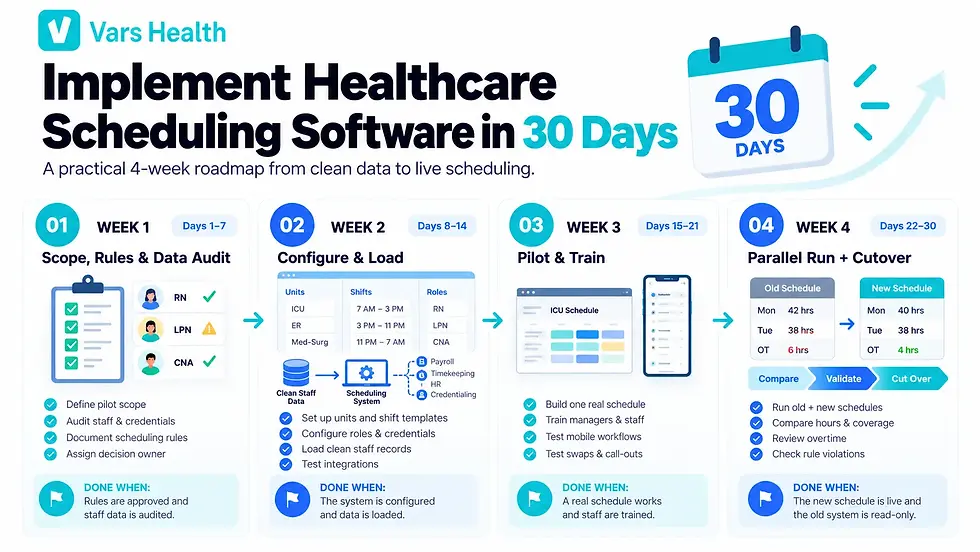
Week | Focus | Owner | Done when |
1 | Scope, rules and data audit | Operations lead | Rule list approved, staff and credential data audited |
2 | Configuration and data load | Scheduler and vendor | Units, shifts, roles, credentials and rules loaded |
3 | Pilot and training | Scheduler, unit managers | One real schedule built and staff trained on mobile app |
4 | Parallel run and cutover | Operations lead | Parallel results compared, old schedule retired |
What do you do in week one?
Decide scope first. Pick the site, unit, or client group for the pilot and write down what is out of scope. Then name one owner who can make decisions without a committee.
Next, audit your data. You need a current list of staff with role, license type, license number, expiration dates, and the units or facilities each person can work. Expired or missing credentials found now are a ten-minute fix. Found after go-live, they block shifts.
Finally, write the rule list: minimum staffing by unit, shift lengths, overtime thresholds, rest gaps, float eligibility, and how swaps get approved. If you are unsure which rules to include, our post on credential-based healthcare staff scheduling explains how credential checks shape the rule list.
Common operational mistake: Importing staff data before cleaning it. Duplicate records and old credential dates move straight into the new system, and the team stops trusting it in the first week.
What do you do in weeks two and three?
Week two is configuration and data load. Set up units, shift templates, roles and credential types, enter or import the cleaned staff records, and apply the rule list. Confirm integrations early. If hours need to reach payroll, or the schedule needs to connect to timekeeping, ask for that to be tested now rather than in week four.
Week three is the pilot. Build one real schedule for the pilot group in the new system. Run a short training session for managers and staff, with the mobile app front and center, since shift swaps and open shift requests only work if people use their phones. Ask the pilot group to try the awkward cases: a swap, a call-out, a request that breaks a rule.
Pro tip for staffing agencies: Include a recruiter and a payroll person in the week three pilot, not only the scheduler. A schedule that looks right but produces the wrong hours for payroll is a failed pilot.
How do you run the cutover in week four?
Run the old and new schedules in parallel for one pay period. Compare hours worked, shifts filled, overtime, and any rule violations the new system caught that the old one missed. Keep a short log of every difference and decide whether each one is a software issue, a data issue, or a rule that needs changing.
When the comparison is clean, name a cutover date and tell staff in writing. After that date, the old schedule is read-only. Leaving it editable is how teams end up with two sources of truth.
What decisions should you make before you start?
Answer these in order, because each one limits the next:
Which site, unit, or client group goes first?
Who owns the rule list and has authority to approve exceptions?
Which rules block an assignment and which only warn?
Who cleans staff and credential data, and by what date?
Which systems must connect: payroll, timekeeping, HR or credentialing?
What is the date for retiring the old schedule?
If you cannot answer one of these, resolve it before week one rather than during week three. Our healthcare scheduling software checklist is a useful companion if you are still choosing a vendor.
What usually delays a scheduling software rollout?
Four things cause most of the delay. Credential data is incomplete. Approvals for rules sit with someone who is not in the project. Integrations are scoped late. And managers are trained once, then never again, so old habits return after the first busy week.
Each has a plain fix: audit credentials in week one, name an approver, test integrations in week two and schedule a short refresher in the first month after go-live. If overtime is the problem pushing you to switch, our post on reducing overtime with healthcare scheduling software shows what to measure before and after.
Frequently asked questions
1. How long does it take to implement healthcare staff scheduling software?
About four weeks for one site with clean data and documented rules. Plan on two to three times longer for multiple facilities, union contracts or significant data cleanup.
2. What data do you need to import into scheduling software?
Staff names and roles, license and certification types with expiration dates, the units or facilities each person can work, employment type, pay or bill rates if the system handles them, and your shift templates. Clean this before import.
3. Should you run the old and new schedule in parallel?
Yes, for one full pay period. It is the only reliable way to catch differences in hours, coverage, and overtime before staff depends on the new system.
4. Who should own a scheduling software implementation?
One operations leader with authority to approve rules and exceptions, supported by the lead scheduler. Vendor support helps, but the decisions belong to your team.
5. What are the most common reasons scheduling software implementations fail?
Unclean data, unapproved rules, late integration testing, and low staff adoption. All four are visible in the first two weeks if you look for them.
6. Can a small clinic implement scheduling software faster?
Often yes, since there are fewer units, fewer rules, and less data. Our post on nurse scheduling software for small clinics covers what a small clinic should prioritize.
7. How do you get nurses to actually use the scheduling app?
Train on the phone, not at a desk. Start with the tasks staff cares about most, such as viewing the schedule and requesting a swap. Our post on self-scheduling for nurses explains how rule-based self-scheduling fits in.
If you are ready to evaluate platforms, take a look at Vars Health healthcare scheduling software, which connects scheduling to credentialing, timekeeping and payroll.


